

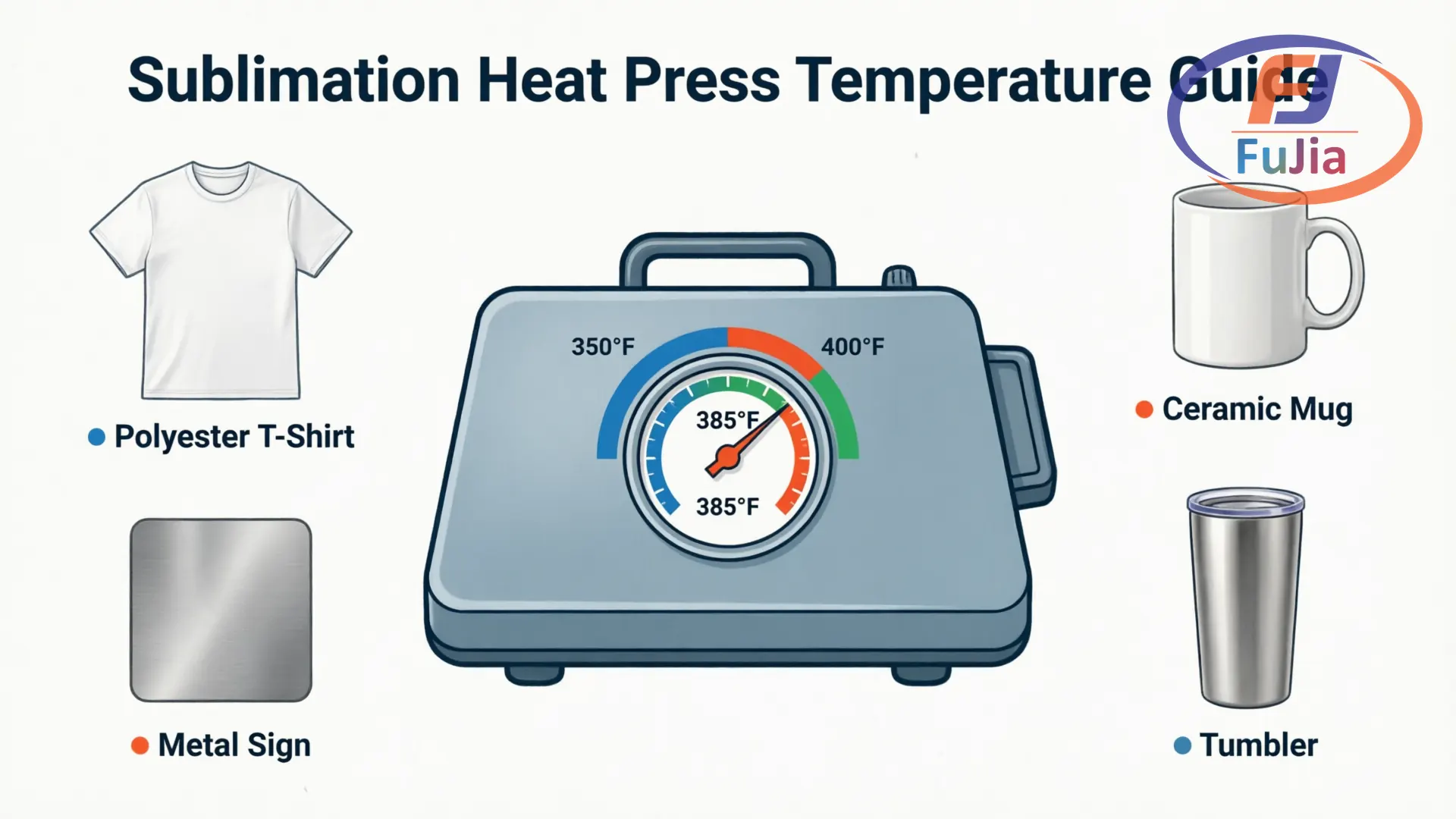
The correct sublimation temperature ranges from 350°F to 400°F (177°C to 204°C), with dwell times between 30 seconds and 7 minutes depending on the substrate. Polyester apparel presses at 385°F (196°C) for 45 to 55 seconds; ceramic mugs require 385 to 400°F for 3 to 4 minutes. Pressure varies from light (fragile items) to firm (thick substrates like slate and ceramic tile).
Key Takeaways
- The sublimation sweet spot is 385°F (196°C) at medium pressure — this covers approximately 80% of all substrates
- Apparel (100% polyester) needs 45 to 55 seconds; hard substrates need 60 seconds to 7 minutes based on coating thickness
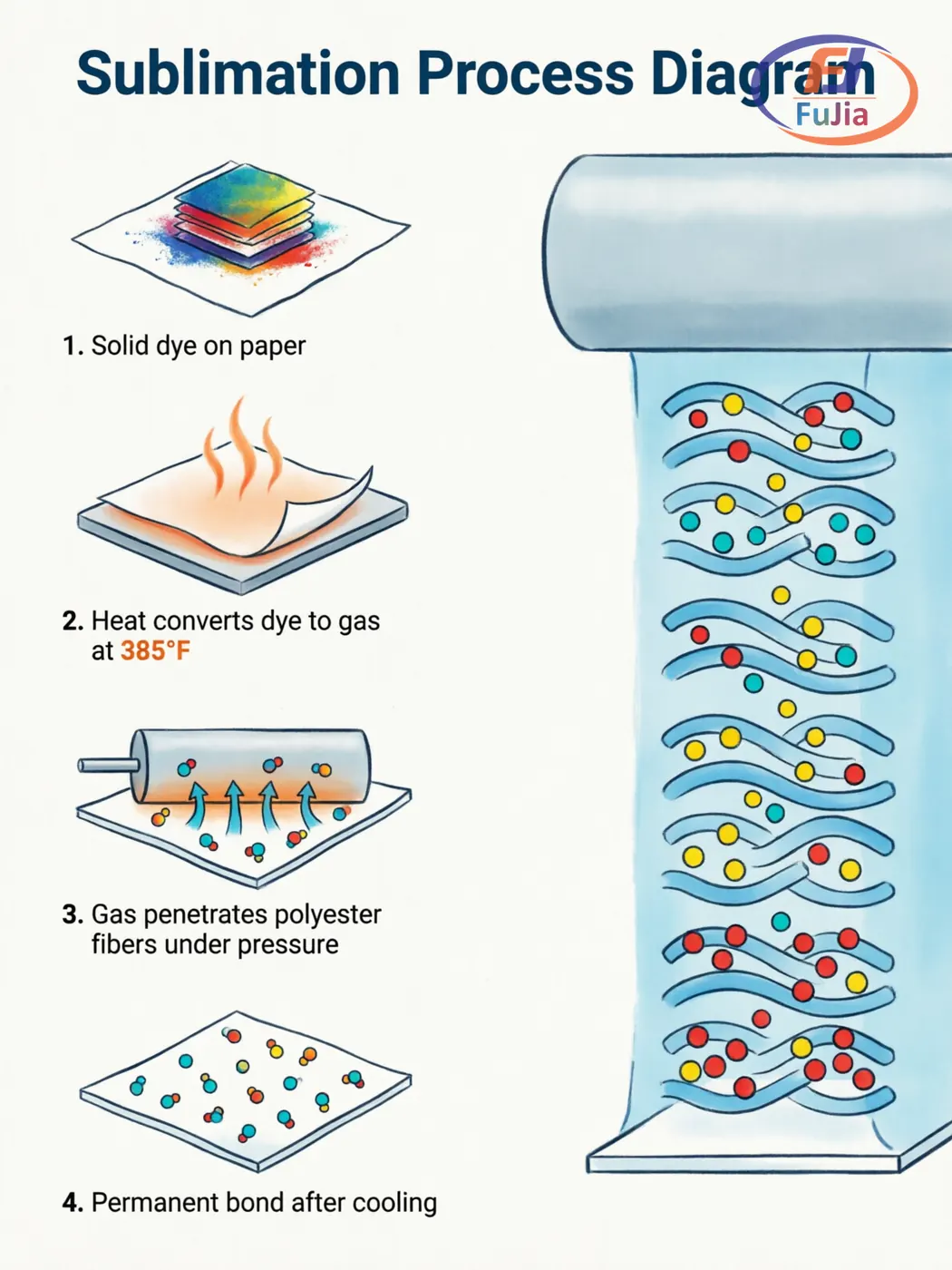
- Sublimation ink gasifies at approximately 350°F (177°C), then chemically bonds with polyester fibers or polymer coatings
- Stainless steel uses lower temperatures (360 to 365°F) because polymer coatings yellow above 380°F
- Always test with a scrap blank before production runs — substrate coatings vary by supplier
What Is Sublimation Temperature?
Sublimation temperature is the heat level at which disperse dye ink transforms from solid to gas and penetrates polyester fibers or polymer coatings. The process occurs above 350°F (177°C), where the dye becomes gaseous without passing through a liquid phase. Polyester’s glass transition temperature (Tg) of approximately 70 to 80°C (158 to 176°F) means the polymer chains loosen enough at sublimation temperatures to accept dye molecules into their structure, creating a permanent chemical bond.
The three variables — temperature, time, and pressure — work together. Temperature determines whether the dye gasifies. Time determines how deeply the gas penetrates the substrate. Pressure determines how evenly the gas transfers from paper to substrate surface. Getting one variable wrong produces faded colors, ghosting, or scorch marks.
Sublimation Temperature Chart: Apparel and Soft Goods
The table below covers 12 common apparel and soft-good substrates. All values represent starting points — adjust by 5°F increments based on results.
| Substrate | Temperature | Time | Pressure |
|---|---|---|---|
| 100% Polyester T-Shirt | 385°F (196°C) | 45 to 55 sec | Medium |
| 65/35 Cotton-Poly Blend | 385°F (196°C) | 45 sec | Medium |
| 60/40 Cotton-Poly Blend | 375 to 385°F (191 to 196°C) | 45 to 55 sec | Medium |
| Polyester Tote Bag | 385°F (196°C) | 45 to 50 sec | Medium |
| Polyester Socks | 385°F (196°C) | 30 to 40 sec | Light to Medium |
| Polyester Cap / Hat | 385°F (196°C) | 45 sec | Medium |
| Polyester Blanket / Fleece | 380 to 400°F (193 to 204°C) | 45 to 60 sec | Medium |
| Polyester Pillowcase | 385 to 400°F (196 to 204°C) | 45 to 60 sec | Medium |
| Polyester Apron | 385°F (196°C) | 45 to 60 sec | Medium |
| Polyester Lanyard | 385°F (196°C) | 50 to 60 sec | Medium |
| Neoprene Can Koozie | 385 to 400°F (196 to 204°C) | 50 to 60 sec | Medium |
| Faux Leather | 350 to 375°F (177 to 191°C) | 40 to 60 sec | Medium |
Cotton-poly blends produce less vibrant results than 100% polyester because sublimation dye only bonds with the polyester portion. A 65/35 blend retains roughly 65% of the dye vibrancy of pure polyester. For 100% cotton garments, sublimation does not work — consider DTF printing instead, which bonds to any fabric type.
Sublimation Temperature Chart: Drinkware
Drinkware sublimation requires longer dwell times than apparel because ceramic and glass coatings are thicker and denser than textile fibers. A mug press or convection oven is mandatory — flat heat presses cannot wrap cylindrical surfaces.
| Substrate | Temperature | Time | Pressure |
|---|---|---|---|
| Ceramic Mug (11 oz) | 385 to 400°F (196 to 204°C) | 180 to 240 sec | Medium (snug fit) |
| Ceramic Mug (15 oz) | 385 to 400°F (196 to 204°C) | 200 to 260 sec | Medium (snug fit) |
| Color-Changing Mug | 385°F (196°C) | ~190 sec | Medium |
| Enamel Mug | 390 to 400°F (199 to 204°C) | 250 to 360 sec | Medium |
| Stainless Tumbler (Heat Press) | 365°F (185°C) | 60 to 90 sec per side | Medium |
| Stainless Tumbler (Oven) | 375 to 380°F (191 to 193°C) | 360 to 480 sec | Shrink wrap |
| Stainless Water Bottle | 360 to 380°F (182 to 193°C) | 60 to 90 sec per side | Medium |
| Glass Cup / Mug | 360 to 400°F (182 to 204°C) | 240 to 420 sec | Light to Medium |
Stainless steel substrates use significantly lower temperatures (360 to 365°F) than ceramics because the polymer coating on stainless is heat-sensitive. Exceeding 380°F on coated stainless risks yellowing the coating permanently, according to coating manufacturer Beacon Promotional‘s technical guidelines. Glass requires long dwell times at lower temperatures to avoid thermal shock cracking.
Sublimation Temperature Chart: Hard Substrates
Hard substrates — metal, ceramic tile, glass, MDF, and acrylic — demand the widest range of settings. Coating thickness and thermal conductivity determine the optimal combination.
| Substrate | Temperature | Time | Pressure |
|---|---|---|---|
| Aluminum Sheet / Sign | 385 to 400°F (196 to 204°C) | 60 to 120 sec | Medium |
| Aluminum License Plate | 400°F (204°C) | 60 to 75 sec | Light to Medium |
| Dog Tag (Aluminum) | 400°F (204°C) | 45 to 60 sec | Medium |
| Photo Panel (ChromaLuxe) | 385 to 400°F (196 to 204°C) | 60 to 95 sec | Medium to Firm |
| Ceramic Tile | 385 to 400°F (196 to 204°C) | 300 to 420 sec | Light to Medium |
| Slate Coaster / Sign | 400°F (204°C) | 360 to 480 sec | Medium |
| Glass Cutting Board | 390 to 400°F (199 to 204°C) | 360 to 600 sec | Light to Medium |
| Glass Coaster | 375 to 400°F (191 to 204°C) | 160 to 240 sec | Light |
| MDF Puzzle | 400°F (204°C) | 60 sec | Medium |
| MDF / Hardboard Coaster | 400°F (204°C) | 60 to 70 sec | Medium |
| Acrylic / FRP Keychain | 375 to 400°F (191 to 204°C) | 60 to 75 sec | Light to Medium |
| Phone Case Insert | 375 to 400°F (191 to 204°C) | 40 to 75 sec | Medium |
| Mouse Pad (Polyester Surface) | 385°F (196°C) | 45 to 50 sec | Medium |
Slate and ceramic tile require the longest dwell times (5 to 8 minutes) because these materials have high thermal mass — the coating needs sustained heat to reach sublimation temperature throughout. ChromaLuxe photo panels from ChromaLuxe use a specialized multi-layer coating that produces photographic-quality results at 400°F for 60 to 95 seconds.
Understanding Pressure: The Hidden Variable
Pressure is the most overlooked factor in sublimation. Temperature and time get all the attention, but uneven pressure causes more failed transfers than any other single variable. Three levels cover all substrates.
Light Pressure
Light pressure means just enough contact to keep the sublimation paper flat against the substrate surface. Fragile items like glass coasters, acrylic keychains, and thin polyester socks use light pressure because heavier force could crack or deform the blank. The sublimation paper should barely be held in place.
Medium Pressure
Medium pressure is the default setting for approximately 80% of sublimation jobs. The operator feels moderate resistance when closing the press, and the substrate does not shift when the paper is gently tugged. Polyester apparel, mouse pads, aluminum signs, and most coated hardboards all use medium pressure.
Firm / Heavy Pressure
Firm pressure applies strong clamping force for thick, dense items where maximum surface contact drives the sublimation gas deep into the coating. ChromaLuxe photo panels, thick ceramic tiles, and natural slate require firm pressure. If the heat press struggles to fully close, the pressure level is correct for these substrates.
The Science: Why Different Materials Need Different Settings
Sublimation ink contains disperse dyes that gasify at approximately 350°F (177°C). Gasification alone does not complete a transfer — the gaseous dye must penetrate the polymer coating or polyester fiber network. Penetration depth depends on two factors: the coating thickness and the thermal conductivity of the substrate material.
Polyester fabric has thin, open fiber structures. Dye gas penetrates quickly — 45 seconds achieves full saturation. Thick ceramic coatings have dense polymer layers that slow gas diffusion, requiring 3 to 7 minutes for complete penetration. Glass is a thermal insulator, meaning the coating surface heats slowly and needs extended dwell times at lower temperatures to prevent thermal shock. Aluminum is a thermal conductor, reaching target temperature rapidly and requiring shorter press times.
For a detailed molecular-level explanation, see our sublimation printing science guide.
5 Common Mistakes and How to Fix Them
1. Faded or Dull Colors
Temperature too low, dwell time too short, or insufficient ink on the paper causes faded output. Increase temperature by 5°F or extend time by 10 seconds. Verify the printer is not in draft or economy mode.
2. Ghosting (Blurry Double Image)
Paper shifting during pressing or after removal produces ghosting. Secure the paper with heat-resistant tape. For stretch fabrics, use tacky sublimation paper that adheres when heated. Remove the paper in one smooth, fast motion.
3. Scorch Marks (Yellow or Brown Stains)
Temperature too high or dwell time too long causes scorching. Common on synthetic blends and faux leather. Lower temperature by 10 to 15°F. Use a Teflon sheet or butcher paper between the heating element and the substrate.
4. Uneven Transfer (Patchy Areas)
Uneven pressure — typically from a warped heat press platen or an irregular substrate surface — causes patchy transfers. Test the press with a temperature strip grid across the platen. For curved items, ensure the mug wrap is tight and centered.
5. Ink Bleeding Beyond Image Edges
Excessive dwell time or oversaturated ICC color profiles cause bleeding. Reduce time by 10 to 15 seconds. Check the ICC profile — some generic profiles push 20% more ink than needed.
Sublimation Paper: How It Affects Settings
The paper grade chosen directly impacts optimal press settings. Different paper weights hold different ink volumes and release dye at different rates.
- Standard paper (70 to 80 gsm): Holds less ink, releases quickly. Suitable for light-coverage designs. May require 5 to 10°F higher temperature.
- Fast-dry paper (100 gsm): Absorbs ink rapidly, dries on the printer surface. The most common choice for production shops. Works well with standard settings.
- High-release paper (120 gsm): Holds maximum ink and transfers a higher percentage to the substrate. Often allows 10 to 15% shorter dwell time while producing brighter results.
- Tacky paper: Becomes adhesive when heated, preventing paper shift on stretch fabrics. Essential for polyester socks, leggings, and any fabric that might move during pressing.
For a complete paper selection guide, see our sublimation transfer paper guide.
Heat Press vs. Convection Oven
The settings above assume a standard clamshell or swing-away heat press. For cylindrical items like tumblers and water bottles, a convection oven with shrink wrap film often produces more consistent results than a mug press.
| Method | Best For | Pros | Cons |
|---|---|---|---|
| Clamshell Heat Press | Flat items: apparel, tiles, metal sheets | Fast, precise pressure control | Cannot do curved surfaces |
| Mug Press | Cylindrical drinkware: mugs, bottles | Direct, even pressure on curves | One item per cycle |
| Convection Oven + Shrink Wrap | Tumblers, irregular shapes, batch production | Even heat distribution, batch capable | Longer setup, shrink film cost |
Convection oven users should increase dwell time by 50 to 100% compared to mug press times and use shrink-wrap film rated for 175°C or higher.
Frequently Asked Questions
Q: What temperature should I use for 100% polyester fabric?
385°F (196°C) for 45 to 55 seconds at medium pressure is the most reliable starting point for pure polyester fabrics. This temperature ensures complete dye gasification while remaining safely below the scorch threshold for most polyester textiles. If the transferred colors appear faded or washed out, increase the temperature to 400°F (204°C) in 5-degree increments. If scorch marks appear — typically visible as yellow or brown discoloration on light-colored fabrics — reduce the temperature to 380°F (193°C). Polyester’s glass transition temperature of approximately 70 to 80°C means the polymer chains fully relax at sublimation temperature, allowing dye molecules to penetrate deeply into the fiber structure for permanent coloration. Always use medium pressure to ensure full contact between the sublimation paper and the fabric surface.
Q: Can I sublimate on 100% cotton fabric?
No, sublimation dye only bonds with polyester fibers or polymer-coated surfaces. Cotton fibers lack the molecular structure required for dye penetration — the gasified dye sits on the surface and washes out within 1 to 2 launderings. For cotton or cotton-blend garments, Direct-to-Film (DTF) printing is the recommended alternative. DTF uses a adhesive-backed film that bonds to any fabric type, including 100% cotton, 60/40 blends, and even nylon. DTF transfers are wash-durable for 50+ cycles and do not require polyester content in the substrate. The trade-off is that DTF transfers have a slightly thicker hand-feel compared to sublimation, which becomes part of the fabric itself. For businesses decorating mixed-fabric garments, many shops maintain both sublimation and DTF equipment to cover all material types.
Q: Why do my sublimation colors look different from what I see on screen?
Color mismatch between monitor and finished transfer is almost always caused by using the wrong ICC color profile, or by comparing the pre-press paper output to the final result. Sublimation ink looks dull and muted on transfer paper before pressing — the colors only become vibrant after the heat transfer process activates the dye. The correct ICC profile, matched to the specific ink and paper combination, manages color translation from screen design to final substrate. Without a proper ICC profile, printers output oversaturated or color-shifted images. Sublimation ink manufacturers like Sawgrass provide proprietary ICC profiles for their ink systems. For compatible bulk ink systems, request ICC profiles from the ink supplier. Also verify that the monitor is color-calibrated — uncalibrated monitors display inaccurate colors regardless of the printing setup.
Q: How long should I wait before removing sublimation paper after pressing?
For apparel substrates, remove the paper immediately after opening the press — hot peeling is standard practice for sublimation and prevents the paper from cooling and re-adhering to the fabric. For hard substrates like ceramic mugs, metal signs, and glass items, wait 10 to 15 seconds for the surface temperature to drop slightly, then peel in one smooth, continuous motion. Never reposition the paper after lifting it from the substrate, as any contact with the hot surface will transfer a ghost image. For tacky sublimation paper used on stretch fabrics, peel quickly and evenly to prevent the adhesive from pulling fabric fibers. The peeling technique matters as much as the timing: slow, hesitant peeling produces ghosting, while a single confident motion produces clean edges. Use heat-resistant gloves when handling hot substrates to prevent burns and ensure consistent peeling speed.
Q: Do I need a different heat press for mugs and T-shirts?
Yes, flat apparel requires a flat heat press (clamshell or swing-away design), while cylindrical drinkware requires either a mug press or a convection oven with shrink wrap film. A flat press cannot apply even pressure to a curved surface, resulting in patchy, incomplete transfers. Mug presses use curved heating elements that wrap around the mug body, applying uniform pressure across the entire decorated area. Most production shops maintain both a flat press for apparel and a mug press for drinkware. For businesses sublimating high volumes of tumblers or irregular shapes, a convection oven with shrink-wrap film provides better heat distribution than a mug press and allows batch processing of multiple items simultaneously. Entry-level mug presses cost approximately $200 to $400, while commercial-grade convection ovens range from $300 to $800 depending on capacity and temperature control precision.
Conclusion
Bookmark this sublimation temperature chart for quick reference at the heat press. For factory-direct sublimation printer pricing, contact Fujia Print — our engineering team in Guangzhou responds within 24 hours.
