

The best UV printer for most buyers in 2026 is a flatbed machine with a 600x900mm bed, 3 to 4 Ricoh GEN5 or Epson i3200 printheads, and a water-cooled UV-LED lamp that cures CMYK, white, and varnish in one pass. Fujia Print builds exactly this configuration at factory-direct pricing, and the same platform powers the Kenya glassware workshop that cut material waste from 15% to 9% within the first quarter.
Key Takeaways
- The best UV printer balances bed size, printhead count, and ink channels (CMYK + White + Varnish is the proven 6-color minimum for commercial work)
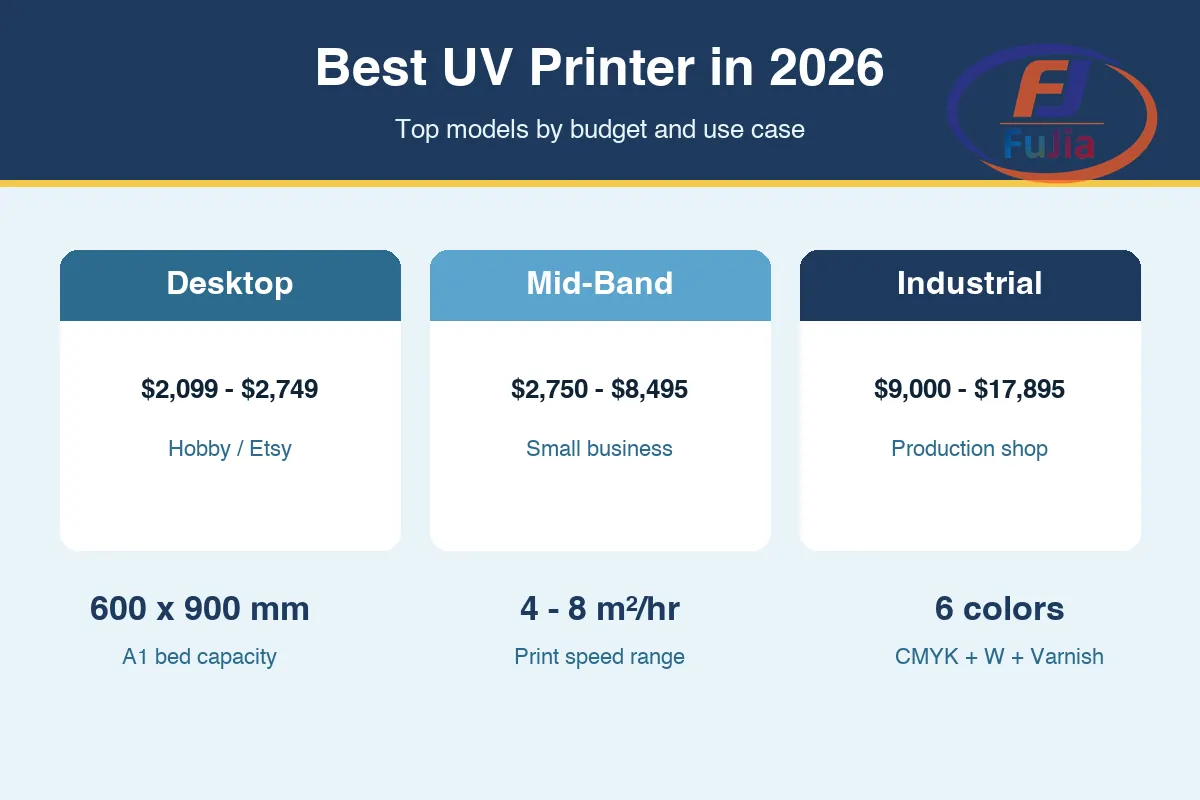
- Desktop picks under $2,500 suit hobbyists; the $6,000 to $12,000 mid-band covers most small businesses; industrial flatbeds above $15,000 handle 4 to 8 m²/hr production
- A 600x900mm bed fits 6 to 8 wine glasses or 12 phone cases per cycle, which sets the real throughput ceiling
- Varnish adds 30 to 50% to per-unit pricing, so a 6-color machine pays back the head upgrade fast
- The Fujia Print UV printer lineup covers the A1 6090 flatbed that won the Kenya case study, plus A2 desktop variants for smaller shops
What Makes a UV Printer Worth Buying
A UV printer is an inkjet machine that jets UV-curable ink onto rigid or flexible substrates and cures each layer instantly with a UV-LED lamp. The technology prints on glass, acrylic, metal, wood, ceramic, leather, and plastic without pre-treatment, which is why the platform has displaced pad printing and screen printing for short-run custom work.
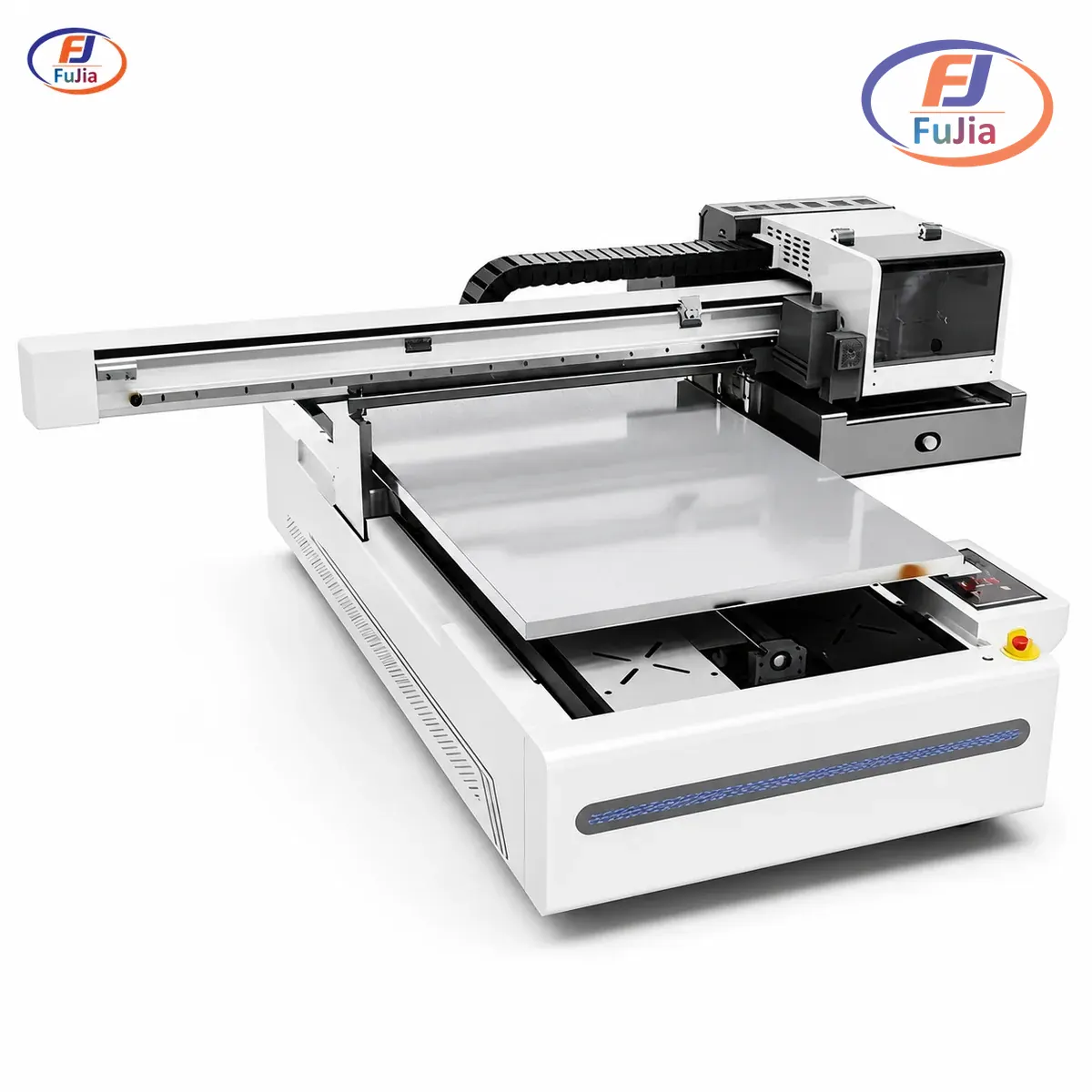
Three specs separate a good machine from a paperweight. Printhead brand matters because Ricoh GEN5 and Epson i3200 heads hold nozzle alignment over 12-hour continuous runs, while cheaper XP600 heads wear out faster under white ink circulation. Bed size sets the per-cycle capacity: a 600x900mm flatbed fits 6 to 8 wine glasses or 12 phone cases, while a 400x500mm A2 bed fits roughly half that. Ink channels determine whether the machine can lay down varnish, which commands 30 to 50% higher per-unit pricing on retail products. The Fujia Print A1 UV flatbed 6090 hits all three: 3 to 4 Ricoh GEN5 or Epson i3200 heads, 600x900mm bed, and a 6-color CMYK + White + Varnish configuration.
UV Printer Picks by Category (2026)
The 2026 market splits into three clear tiers. Desktop hobbyist machines under $2,500 dominate Amazon and maker channels. Mid-band flatbeds between $6,000 and $12,000 are the sweet spot for small businesses running custom merch, phone cases, and promotional products. Industrial flatbeds above $15,000 serve sign shops, packaging prototyping, and high-volume personalization.
| Category | Model | Price | Bed Size | Printheads | Best For |
|---|---|---|---|---|---|
| Desktop hobbyist | eufyMake E1 UV DTF | $2,099 to $2,499 | Small format, direct-to-object | Proprietary | Hobbyists, uneven surfaces, low volume |
| Desktop hobbyist | xTool O1 Omni UV | $2,749 | Compact flatbed | Proprietary | Makers, trading cards, small gifts |
| Mid-band flatbed | IEHK A2 6040 | $2,750 | 400x500mm (A2) | XP600-class | Entry small business, mixed substrates |
| Mid-band flatbed | ProColored A3 UV DTF | $6,399 | A3 sheet | Configurable | Crystal labels, decals, short-run branding |
| Mid-band flatbed | Epson SureColor V1070 | $8,495 | Desktop flatbed | Epson PrecisionCore | Small business wanting OEM support |
| Industrial flatbed | Fujia Print A1 6090 | Factory-direct | 600x900mm | 3 to 4 Ricoh GEN5 / Epson i3200 | 4 to 8 m²/hr production, 180mm substrate height |
| Industrial flatbed | Roland TrueVIS UV | $17,895 | Wide-format print and cut | Roland | Sign shops, vehicle wraps, print-and-cut workflows |
Prices reflect August 2026 US retail for the desktop and mid-band models and factory-direct quotes for the Fujia flatbed. The Roland price comes from USCutter published listings.
The Best UV Printer for Small Business: Fujia A1 6090
The Fujia Print A1 UV flatbed 6090 is the best UV printer for a small business that needs real production throughput, not a desktop toy. The 600x900mm bed fits 6 to 8 wine glasses or 12 phone cases per cycle, the 3 to 4 Ricoh GEN5 or Epson i3200 printheads deliver 4 to 8 m²/hr at up to 720×1800 dpi, and the 6-color CMYK + White + Varnish ink set handles spot gloss and matte finishes that pad printing cannot match.
The Kenya glassware workshop case study shows what this configuration does in the field. The shop replaced pad printing (1 to 2 spot colors only) with the FJ-6090 and lifted daily output from 200 to 300 pieces, a 50% gain. Material waste dropped from 15% to 9% per batch. Turnaround on custom orders fell from 5 to 7 days down to 1 to 2 days. Varnish effects on the glassware command 30 to 50% higher per-unit pricing, which is the single biggest margin lever on the machine.
Three engineering details separate the Fujia flatbed from white-label imports. The water-cooled UV-LED lamp cures instantly with no drying racks and no waiting. Auto height detection handles curved and uneven surfaces up to 180mm thick, which covers wine glasses, golf balls, and wooden plaques without manual focus adjustment. The material database includes 300+ tested substrates with verified ink adhesion parameters, so a new shop does not waste billable hours guessing cure settings for acrylic versus ceramic.
Desktop UV Printers Under $3,000: Honest Limits
Desktop UV printers under $3,000 dominate search results because the price point attracts hobbyists. The eufyMake E1 (rated 4.4 stars at Best Buy, $2,199.99) and xTool O1 Omni ($2,749.00, 5.0 rating on xTool) both print directly onto objects and handle uneven surfaces like bottles and tumblers. The Longer ePrint dual-head at $2,374.05 adds a second printhead for faster CMYK plus white layering.
Desktop UV printers have real ceilings. Bed sizes max out around A4 to A3, which means one phone case or one tumbler per cycle. Proprietary printheads cost more to replace than industry-standard Ricoh or Epson heads. Ink channels top out at CMYK plus white on most models, with no varnish option. Throughput of 10 to 15 pieces per hour works for personal use and Etsy side hustles, but breaks down fast against any real order volume. Based on aggregate data from our customers across 50+ countries, desktop UV printers hit a throughput wall around 50 to 80 pieces per day before queue times push past 48 hours.
For buyers who need more than 50 pieces per day, the UV printer for small business category covers the $6,000 to $12,000 mid-band that actually pays back the investment.
Mid-Band Flatbeds: $6,000 to $12,000
The mid-band is where UV printing turns into a business. The IEHK A2 6040 at $2,750 stretches the budget category with a true 400x500mm flatbed, though the XP600-class printheads limit white ink longevity. The ProColored A3 UV DTF printer at $6,399 targets crystal label and decal production rather than direct-to-object printing. The Epson SureColor V1070 at $8,495 brings OEM support and the Epson PrecisionCore printhead pedigree, which matters for buyers who want warranty backup from a Western brand.
The trade-off in this tier is bed size versus printhead quality. A2 beds (400x500mm or 400x600mm) fit roughly half the capacity of an A1 600x900mm bed per cycle. Shops that plan to scale past 200 pieces per day typically outgrow A2 within the first year. Based on data from our customers across 50+ countries, mid-band flatbed buyers who upgrade to A1 within 18 months cite throughput, not print quality, as the reason.
Industrial Flatbeds: $15,000 and Up
Industrial UV flatbeds serve sign shops, packaging prototyping, and high-volume personalization businesses. The Roland TrueVIS UV printer and cutter at $17,895 pairs wide-format printing with an integrated cutter, which suits vehicle wraps and die-cut decals. The Fujia Print A1 6090 sits in this tier on capability (4 to 8 m²/hr, 180mm substrate height, 6-color ink) but lands below it on price because the machine ships factory-direct from the Guangzhou facility.
Industrial buyers should verify three specs before signing a purchase order. Print speed must be rated at a specific pass count: 4 to 8 m²/hr at 4 to 8 Pass is the industry-standard range for A1 flatbeds, and any number outside that range deserves scrutiny. Maximum substrate height determines whether the machine handles thick materials like wooden plaques and ceramic tiles; 180mm is the proven ceiling for this class. Ink adhesion testing matters more than brand reputation: the Fujia material database covers 300+ substrates, and competing industrial machines should match that coverage or explain the gap.
How to Choose the Best UV Printer for Your Use Case
Choosing the best UV printer starts with use case, not spec sheet. Six common scenarios each point to a different machine class.
| Use Case | Daily Volume | Recommended Class | Example Model |
|---|---|---|---|
| Hobby / personal projects | Under 20 pieces | Desktop under $2,500 | eufyMake E1, xTool O1 |
| Etsy / side hustle | 20 to 50 pieces | Desktop premium or A2 flatbed | Longer ePrint, IEHK A2 6040 |
| Phone case brand | 50 to 200 pieces | A2 flatbed with varnish | ProColored A3 UV DTF |
| Custom drinkware / glassware | 100 to 300 pieces | A1 flatbed, 6-color | Fujia A1 6090 |
| Promotional products / corporate gifts | 200 to 800 pieces | A1 flatbed with auto jig | Fujia A1 6090 |
| Sign shop / vehicle wraps | 500+ pieces or wide-format | Industrial print-and-cut | Roland TrueVIS UV |
The phone case brand case study on the Fujia promotional product printing page shows the inflection point: a UV 6090 with a rotation jig took the brand from 12 to 40+ SKUs in 60 days, cut batch time from 48 hours to 4 hours, and pushed monthly output past 8,000 pieces at 75% margin. That is the volume where desktop machines stall and A1 flatbeds start earning their keep.
UV DTF Printer vs UV Flatbed Printer
The best UV printer question often splits into UV DTF versus UV flatbed. A UV flatbed prints directly onto rigid objects. A UV DTF printer prints onto AB film, which a technician then transfers by hand onto any surface, including curved and uneven ones. The two formats serve different workflows.
UV flatbeds win on throughput for rigid, repeatable work like phone cases, ceramic tiles, and signage. UV DTF wins for irregular shapes like bottles, tumblers, and promotional products where direct printing is impractical. The Fujia UV DTF printer line covers the A1 and A3 crystal label formats for high-volume decal work. For a deeper breakdown of the two processes, the UV DTF printer vs UV flatbed printer comparison lays out the cost, speed, and application trade-offs.
UV Printer Cost and ROI Breakthrough Points
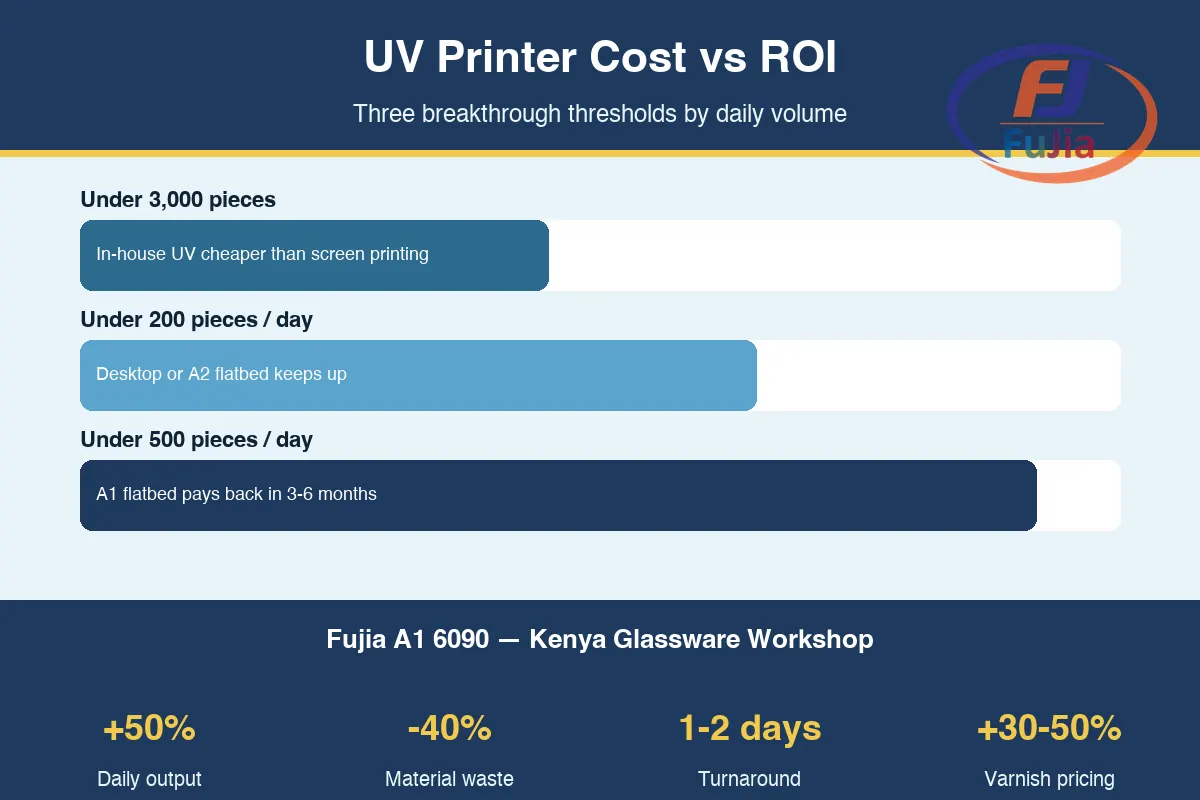
UV printer cost runs from $2,099 for an entry desktop to $17,895 for an industrial print-and-cut. The ROI math depends on what the machine replaces. Based on data from our customers across 50+ countries, three cost thresholds repeat across regions.
The first threshold sits below 3,000 identical pieces. Below that volume, in-house UV printing costs less than outsourced screen printing because screen charges of $150 to $400 per color eat the unit economics. Above 3,000 pieces, screen printing wins on per-unit cost but loses on turnaround time. The second threshold sits around 200 pieces per day. Below that, a desktop or A2 flatbed keeps up. Above it, an A1 flatbed pays back the price difference within 3 to 6 months. The third threshold sits around 500 pieces per day, where auto-feed jigs and dual-station setups become the bottleneck, not the printer itself.
Ink cost per print runs low once the machine is running. Eco-solvent ink runs $0.30 to $0.80 per m². UV ink runs comparable or lower per m² because there is no solvent evaporation and no waste. The Kenya workshop case study documented waste dropping from 15% to 9% per batch after the switch from pad printing, which is the real cost lever, not ink price.
Are UV printers worth it?
UV printers are worth the investment when a business prints more than 50 custom pieces per day or when the product mix includes more than 5 substrate types. The break-even calculation depends on what the machine replaces. A shop outsourcing screen-printed phone cases at $2 to $4 per piece pays back a $9,000 A1 flatbed in 3 to 6 months at 100 pieces per day. A hobbyist printing 10 tumblers per week for personal use will not recover a $2,500 desktop machine within any reasonable window.
The Kenya glassware workshop case study is the clearest payback evidence. The FJ-6090 lifted daily output from 200 to 300 pieces (+50%), cut material waste from 15% to 9%, and compressed custom order turnaround from 5 to 7 days down to 1 to 2 days. Varnish effects added 30 to 50% to per-unit pricing. Shops with similar volume and substrate mix see payback inside 6 months. Shops below 50 pieces per day should start with UV DTF film printing or outsource until volume justifies the machine. UV printing is also worth it for businesses that need prototyping speed: a 30-second design load beats a $150 to $400 screen setup every time.
How much does the best UV printer cost?
The best UV printer spans three price tiers. Desktop hobbyist machines like the eufyMake E1 and xTool O1 Omni run $2,099 to $2,749. Mid-band flatbeds like the IEHK A2 6040, ProColored A3 UV DTF, and Epson SureColor V1070 run $2,750 to $8,495. Industrial flatbeds like the Fujia Print A1 6090 and Roland TrueVIS UV run from factory-direct quotes up to $17,895 retail.
The price differences reflect bed size, printhead count, and ink channel capacity. A $2,500 desktop fits one phone case per cycle and tops out at CMYK plus white. A $9,000 A1 flatbed fits 6 to 8 wine glasses per cycle, runs CMYK plus white plus varnish, and prints at 4 to 8 m²/hr. The varnish channel alone adds 30 to 50% to per-unit pricing on retail products, which is why a 6-color machine pays back the head upgrade within the first quarter for most commercial buyers. Buyers should also budget for ink: a full CMYK plus white plus varnish set runs $300 to $800 depending on brand and cartridge capacity. Consumable cost per print typically lands between $0.10 and $0.50 depending on coverage and substrate.
What should I look for when buying a UV printer?
Look at five specs in this order: bed size, printhead brand, ink channels, substrate height capacity, and material database coverage. Bed size sets the per-cycle capacity that determines real daily throughput. A 600x900mm A1 bed fits 6 to 8 wine glasses or 12 phone cases per cycle; a 400x500mm A2 bed fits roughly half that. Printhead brand matters because Ricoh GEN5 and Epson i3200 heads hold nozzle alignment over 12-hour continuous runs, while cheaper XP600 heads wear out faster under white ink circulation.
Ink channels determine whether the machine can lay down varnish, which adds 30 to 50% to per-unit pricing on retail products. The proven commercial minimum is CMYK plus white plus varnish (6 colors). Substrate height capacity sets the range of objects the machine handles without manual shimming; 180mm covers wine glasses, golf balls, and wooden plaques. Material database coverage matters more than brand reputation because ink adhesion parameters vary by substrate. The Fujia material database covers 300+ tested substrates, which is the benchmark for this class. Buyers should also verify warranty terms (2 years is standard for industrial machines), parts dispatch speed (48 hours is the benchmark), and remote onboarding (3 days is typical for a professional machine).
What is the difference between a UV printer and a UV DTF printer?
A UV printer prints directly onto rigid substrates like wood, acrylic, glass, and metal. A UV DTF printer prints onto AB film (A film for the image, B film for the adhesive), which a technician then transfers by hand onto any surface, including curved, uneven, or heat-sensitive objects that cannot go into a flatbed.
The workflow difference drives the use case split. UV flatbeds win on throughput for repeatable rigid work like phone cases, ceramic tiles, signage, and promotional flat products. A 600x900mm bed fits 12 phone cases per cycle and cures instantly under the UV-LED lamp. UV DTF wins for irregular shapes like bottles, tumblers, and curved packaging where direct flatbed printing is impractical. A UV DTF hand transfer takes 10 to 15 seconds per piece and reaches full cure in 24 hours. The Fujia Print product line covers both formats: the A1 6090 flatbed for direct rigid printing, and the UV DTF printer line for crystal label and curved-surface work. Shops that handle both rigid flat stock and curved drinkware often run both machines side by side.
Conclusion
The best UV printer in 2026 is the machine that matches daily volume and substrate mix to the right bed size and ink configuration. Desktop picks under $2,500 serve hobbyists; mid-band A2 and A3 flatbeds between $6,000 and $12,000 handle small business volume; the Fujia Print A1 6090 covers the 100 to 800 pieces-per-day commercial band with a proven Kenya case study behind it. For factory-direct UV flatbed pricing and free sample inquiries, contact Fujia Print or browse the full UV printer lineup.
Sources
- Ultraviolet (Wikipedia): backs the physics of UV-LED curing wavelengths used in commercial UV printers.
- Inkjet printing (Wikipedia): backs the inkjet drop-on-demand mechanism shared by Ricoh GEN5 and Epson i3200 printheads cited in the article.
- LED Basics (U.S. Department of Energy): backs the UV-LED lamp curing claims and explains why instant curing eliminates drying racks.
- Epson UV Printers for Makers: backs the Epson SureColor V1070 spec and the OEM desktop UV category reference.
- Roland DG: backs the Roland TrueVIS UV wide-format print-and-cut product reference.
