

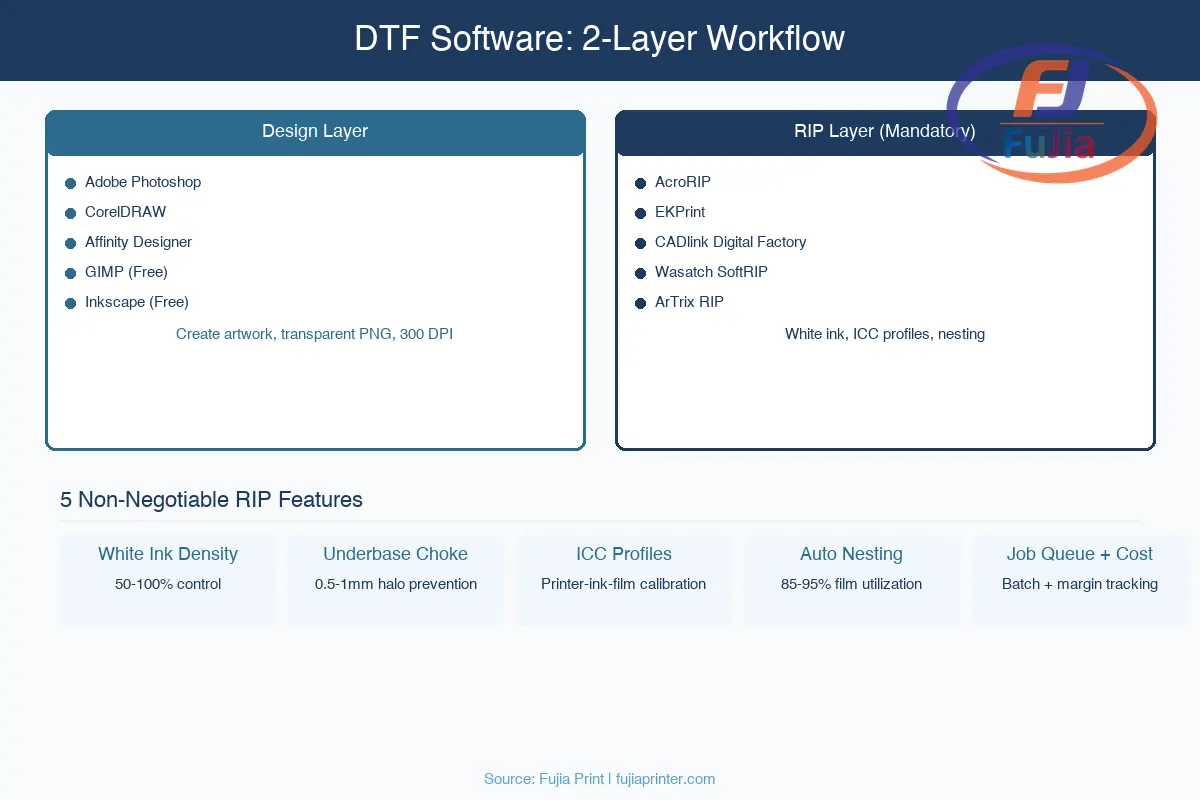
DTF printer software consists of two layers: design software for creating artwork (Photoshop, CorelDRAW, GIMP, Inkscape) and RIP software for controlling the printer (AcroRIP, EKPrint, CADlink Digital Factory, Wasatch). The RIP layer is mandatory because DTF printing requires white ink underbase management, ICC color profiling, and gang sheet nesting that standard printer drivers cannot handle. Fujia Print DTF printers ship with full RIP software support and remote onboarding in 3 days for businesses across 50+ countries.
Key Takeaways
- RIP software is mandatory for DTF printing: it manages white ink underbase, ICC color profiles, and automatic gang sheet nesting that standard drivers cannot.
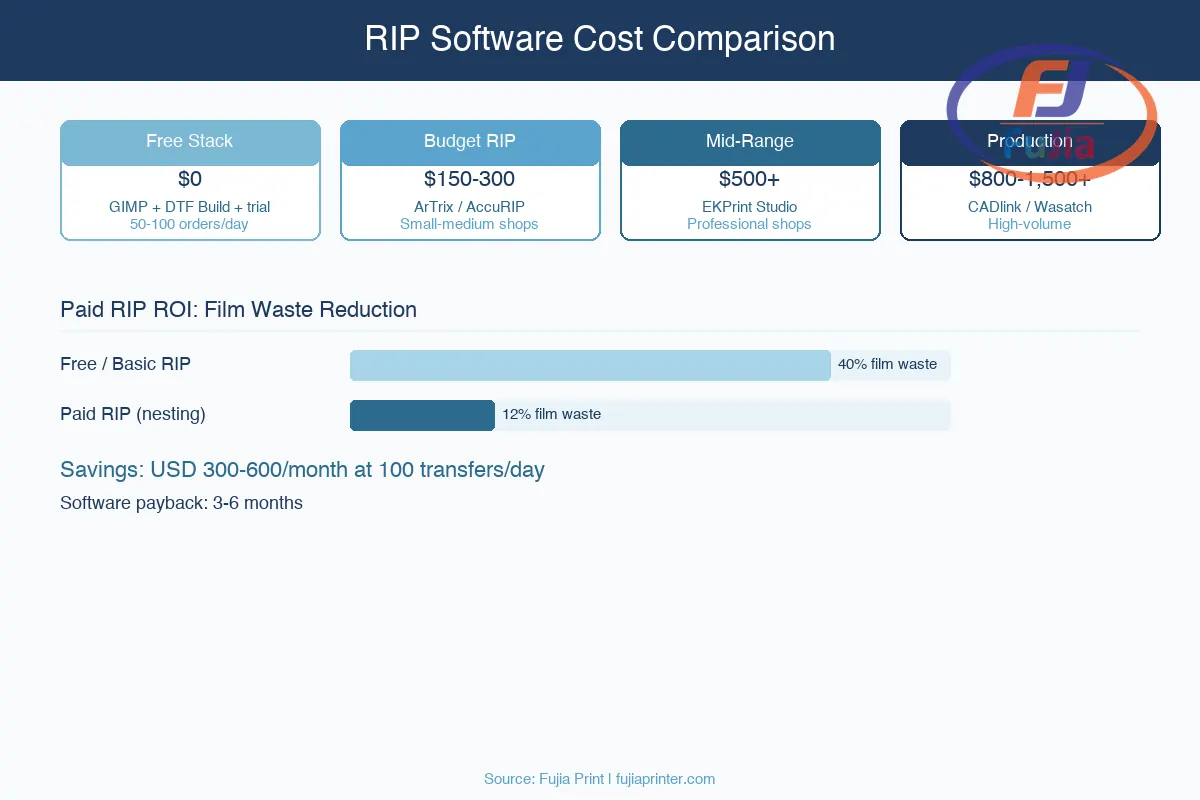
- Free DTF software stack (GIMP/Photopea + DTF Build + RIP trial) costs USD 0 and handles 50-100 orders per day.
- Paid RIP software ranges USD 150-1,500 one-time: AcroRIP (budget), EKPrint (mid-range), CADlink Digital Factory (professional), Wasatch (high volume).
- Advanced nesting in paid RIPs reduces film and ink waste by 30-50%, paying for the license within 3-6 months at production volume.
- White ink density control and “choke” settings are the two most critical DTF RIP features for dark garment print quality.
Why DTF Printing Requires RIP Software
Standard printer drivers cannot produce DTF transfers because they lack three essential capabilities.
1. White Ink Underbase Control
DTF printing on dark garments requires a white ink underbase beneath CMYK colors. The RIP software controls white ink density (50-100%), applies a “choke” that pulls the white layer 0.5-1mm inside the color layer to prevent halos, and manages highlight suppression for light-colored garments. Without precise white ink control, prints on dark fabric appear washed out or develop visible white halos around design edges.
2. ICC Color Profiling
RIP software translates screen colors (RGB) to printer output (CMYK + white) using ICC profiles calibrated for specific printer models, ink sets, and PET film brands. A correct ICC profile ensures the printed colors match the on-screen design. Free or pirated software often lacks ICC support, forcing users into endless trial-and-error color correction that wastes film and ink.
3. Gang Sheet Nesting
Gang sheet nesting automatically arranges multiple designs onto a single PET film sheet to minimize unused space. Advanced nesting algorithms achieve 85-95% film utilization, reducing film and ink waste by 30-50% compared to printing designs individually. For a shop printing 100 transfers daily, this represents USD 300-600 monthly savings in film costs alone. The DTF equipment market, growing at a 6.0% CAGR according to Grand View Research, is driven partly by software-driven efficiency gains in production workflows.
Research by Zhu et al. (2025) in the International Journal of Adhesion and Adhesives (Vol. 139) demonstrates that precise ink layer thickness control directly affects TPU adhesive bonding and wash durability, reinforcing the importance of RIP-level print parameter management.
Design Software Layer
| Software | Price | Best For | DTF Strength |
|---|---|---|---|
| Adobe Photoshop | Subscription (USD 22-60/month) | Professional designers | Industry-standard layer/PEG workflow |
| Adobe Illustrator | Subscription | Vector artwork, logos | Scalable design at any size |
| CorelDRAW | One-time (USD 499) | Vector + raster combined | One-time purchase, strong typography |
| Affinity Designer | One-time (USD 70) | Budget professionals | 90% of Photoshop power at 10% cost |
| GIMP | Free | Beginners, photo editing | Open source, transparent PNG export |
| Inkscape | Free | Vector logos, lettering | Scalable DTF artwork |
Design software produces the artwork file (PNG with transparent background, 300 DPI minimum) that the RIP software then processes for printing.
RIP Software Layer: Free vs Paid
Free RIP Options
Most DTF printers ship with bundled RIP software, often a licensed or basic version of AcroRIP. Free options also include:
| Software | Price | Limitations |
|---|---|---|
| Bundled RIP (AcroRIP basic) | Included with printer | Basic white control, no advanced ICC |
| RIP trial versions | USD 0 (30-day) | Time-limited, full features during trial |
| GIMP + print plugins | Free | No white underbase management, not recommended |
Free software suits beginners learning the DTF workflow. The primary limitations are limited ICC profile support (causing color inaccuracy), basic white ink control (one-size-fits-all settings), and no nesting tools (increased film waste).
Paid RIP Software Comparison
| Software | Price | Best For | Key Features |
|---|---|---|---|
| ArTrix RIP | USD 150 | Small shops | Works with Roland, Mimaki, Epson |
| AccuRIP Black Edition | USD 200-300 | Small to medium businesses | White ink layering, powder simulation, Epson/Ricoh/Brother support |
| EKPrint Studio | USD 500+ | Professional DTF shops | CMYK + white management, ICC profiles, Epson printheads |
| CADlink Digital Factory DTF | USD 800-1,500 | Production environments | Single-pass white+color, auto-nesting, variable data, knockout for black garments |
| Wasatch SoftRIP | USD 1,000+ | High-volume production | Industry-leading color accuracy, roll-to-roll DTF, advanced nesting |
The return on investment for paid RIP software is measurable: advanced nesting reduces film waste by 30-50%, and ICC profile support eliminates color-mismatch reprints. A shop printing 100 transfers daily saves USD 300-600 monthly in film and ink costs, recovering the software investment within 3-6 months. The global custom t-shirt printing market, projected to grow from USD 5.82 billion in 2025 to USD 17.22 billion by 2034 at a 12.81% CAGR according to Fortune Business Insights, continues to drive software investment by DTF print shops.
Essential RIP Features Checklist
When evaluating DTF RIP software, verify these five non-negotiable features:
1. White Ink Density Control
The RIP must allow per-job adjustment of white ink density (50-100%). Too little white ink produces transparent prints on dark fabric; too much creates a stiff, plastic-like feel. Density control prevents both failure modes.
2. White Underbase Choke
The choke setting pulls the white layer slightly inward from the color layer edge, preventing white halos around printed designs on dark garments. Without choke control, every design edge shows a visible white outline.
3. ICC Profile Import and Customization
The RIP must support importing ICC profiles for your specific printer, ink, and film combination. This ensures predictable color output across jobs and media types. Custom profile creation tools are a bonus.
4. Automatic Nesting
Auto-nesting arranges multiple designs onto film sheets to maximize utilization. Evaluate nesting efficiency at 85-95% film coverage. Some RIPs also support gang sheet templates for recurring order types.
5. Job Queue and Cost Calculation
Production RIPs include job queuing for batch processing and cost calculators that estimate ink and film usage per job. Cost calculation enables accurate customer quoting and margin tracking.
Setting Up DTF Printer Software
Step 1: Install Printer Driver
Install the manufacturer’s printer driver first. For Epson-based DTF printers, this includes the basic printer driver that recognizes the printhead configuration and media size.
Step 2: Install RIP Software
Install the RIP software (bundled or purchased) and connect it to the printer. Most RIPs auto-detect connected DTF printers; manual configuration is required for converted or third-party setups.
Step 3: Load ICC Profiles
Load the ICC profile matching your ink brand and PET film type. Fujia’s 13-color DTF ink system includes pre-calibrated ICC profiles for standard and premium films, ensuring consistent color from the first print.
Step 4: Calibrate White Ink Settings
Run a white ink density test chart. Print density swatches from 50-100% on dark fabric, compare results, and record the optimal density for your blank garment types. Repeat calibration when changing film or ink brands.
Step 5: Configure Nesting Preferences
Set the nesting spacing (0.25-0.50 inch between designs is standard), margin preferences, and film roll dimensions. Test with a mixed design batch to verify film utilization above 85%.
Common Software Problems and Solutions
Problem 1: Colors Do Not Match the Screen
Cause: Missing or incorrect ICC profile. Solution: Load the correct ICC profile for your printer, ink, and film combination. Recalibrate the monitor or use a hardware colorimeter. Verify the design file uses CMYK color mode (not RGB) for production.
Problem 2: White Halos Around Dark Garment Prints
Cause: Missing choke setting or incorrect white density. Solution: Enable white underbase choke at 0.5-1mm in the RIP settings. Reduce white density if halos persist. Test on scrap fabric before production runs.
Problem 3: Software Crashes or Instability
Cause: Pirated software or outdated version. Solution: Use licensed software with regular updates. Pirated RIP copies are a leading cause of crashes, driver conflicts, and printhead damage from corrupted commands. Budget for legitimate software licensing.
Problem 4: Banding or Streaks in Output
Cause: Printhead alignment or white ink settling. Solution: Run the nozzle check and cleaning cycle before print jobs. Verify white ink circulation is active (automatic systems reduce clogging risk by 70%). Align printheads per manufacturer instructions.
What software is best for DTF printing?
The best DTF printing software combines design software for artwork creation and RIP software for printer control. For design, Adobe Photoshop is the industry standard, with Affinity Designer (one-time USD 70) and free GIMP/Inkscape as budget alternatives. For RIP software, AccuRIP Black Edition (USD 200-300) is the best balance of price and features for small to medium businesses, EKPrint Studio (USD 500+) suits professional DTF shops with Epson printheads, and CADlink Digital Factory (USD 800-1,500) leads production environments with advanced nesting and variable data. Free options include bundled RIP software that ships with DTF printers and 30-day trial versions. The right choice depends on production volume: free tools handle 50-100 orders daily; paid RIPs pay for themselves through 30-50% film waste reduction at higher volume.
Can I print DTF without software?
No, you cannot print DTF transfers without RIP software. DTF printing requires white ink underbase management, ICC color profiling, and print parameter control that standard printer drivers cannot provide. The RIP software is what enables the printer to output the white underbase layer beneath CMYK colors for dark garment printing. Without RIP software, the printer either outputs only CMYK colors (invisible on dark fabric) or produces prints without the white layer entirely. All DTF printers ship with bundled RIP software or support free trial versions. While some all-in-one printers include integrated software with touchscreen interfaces, professional production requires dedicated RIP software for color accuracy, nesting efficiency, and consistent quality.
Is there free DTF software?
Yes, there are free DTF software options for beginners. The free software stack consists of: GIMP or Photopea for design creation (free, open source, transparent PNG export), DTF Build for automatic gang sheet nesting (free, no watermark), and RIP trial versions or bundled software that ships with DTF printers. This stack handles production volumes up to 50-100 orders per day. However, free software has limitations: limited ICC profile support causes color inaccuracy, basic white ink control offers one-size-fits-all settings, and no advanced nesting tools increase film waste. When monthly revenue justifies the investment, paid RIP software (USD 150-1,500) provides professional color management, granular ink control, and automated nesting that reduces film waste by 30-50%.
Do I need a RIP software for DTF?
Yes, you need RIP software for DTF printing. The RIP (Raster Image Processor) is responsible for three functions that standard printer drivers cannot perform: generating the white ink underbase for dark garments, applying ICC color profiles for accurate color output, and arranging designs into gang sheets for efficient film use. Without RIP software, DTF printers cannot produce commercial-quality transfers. All legitimate DTF printers ship with bundled RIP software (typically AcroRIP or EKPrint), and trial versions are available from major RIP developers. For production businesses printing 50+ orders daily, dedicated RIP software with advanced nesting and ICC support provides a measurable return through reduced material waste and reprints. Fujia DTF printers include RIP software setup guidance as part of remote onboarding.
Conclusion
DTF printer software pairs design tools with mandatory RIP software that manages white ink underbase, ICC color profiles, and gang sheet nesting. For DTF systems with full software support and onboarding, explore the Fujia DTF printer lineup or discover our apparel printing solutions.
Sources
- Zhu et al. (2025): TPU Nanocomposites for Transfer Printing: Research on ink layer thickness control effects on TPU adhesive bonding and wash durability, published in International Journal of Adhesion and Adhesives, Vol. 139.
- Fortune Business Insights: Custom T-Shirt Printing Market, 2026-2034: Market size USD 5.82B (2025) to USD 17.22B (2034) at 12.81% CAGR, driving software investment by DTF print shops.
- Grand View Research: Direct To Film Printing Market, 2025-2030: DTF equipment market at 6.0% CAGR, with software as a growing segment of production costs.
- AATCC TM61 (2023): Colorfastness to Laundering: Wash durability standard validating DTF print quality achieved with proper RIP parameter management.
- AATCC TM135: Dimensional Changes After Home Laundering: Fabric stability standard relevant to DTF print quality assessment.
