

UV DTF stickers are decals printed with UV-curable ink onto a two-film transfer system, then applied to hard surfaces by peeling and pressing, with no heat press required. Unlike vinyl cutting or traditional DTF printing, UV DTF produces full-color, scratch-resistant, weatherproof graphics that bond to glass, metal, plastic, wood, and ceramic in a single step.

Key Takeaways
- UV DTF stickers use UV-curable ink printed on A film, laminated with B film, then transferred to any hard surface without heat
- Durability ranges from 2 to 5+ years of environmental exposure, with full waterproof and UV-resistant properties
- The core equipment is a UV DTF printer, A/B film, laminator, and UV ink in CMYK plus white plus varnish
- Print shops and small businesses benefit most from UV DTF for custom drinkware, phone cases, packaging, and signage
- Fujia Print manufactures UV DTF printers and consumables as a single-source supplier, with factory-direct pricing and in-house testing
How UV DTF Sticker Printing Works
UV DTF (Ultraviolet Direct-to-Film) printing is a process where designs are printed onto a special adhesive film using UV-curable ink, then laminated with a transfer film and applied directly to hard surfaces. The UV ink cures instantly under LED ultraviolet light during printing, creating a durable, raised, glossy finish that resists scratching, water, and sunlight.
The “DTF” in UV DTF refers to the film-transfer method, but the chemistry differs fundamentally from traditional DTF printing used for textiles. Traditional DTF uses water-based pigment ink, hot-melt powder, and a heat press to bond designs into fabric. UV DTF uses photo-initiator-activated ink that hardens under UV light, paired with a cold-transfer adhesive film that sticks to rigid surfaces. No heat. No powder. No washing machine.
A UV DTF sticker typically has three ink layers: the CMYK color layer for the design, a white ink layer for opacity on dark or transparent surfaces, and a varnish layer that creates the signature glossy texture and protects against abrasion. This three-layer structure gives UV DTF stickers a distinctive raised, embossed feel that vinyl stickers and printed decals cannot replicate.
Equipment and Materials Needed
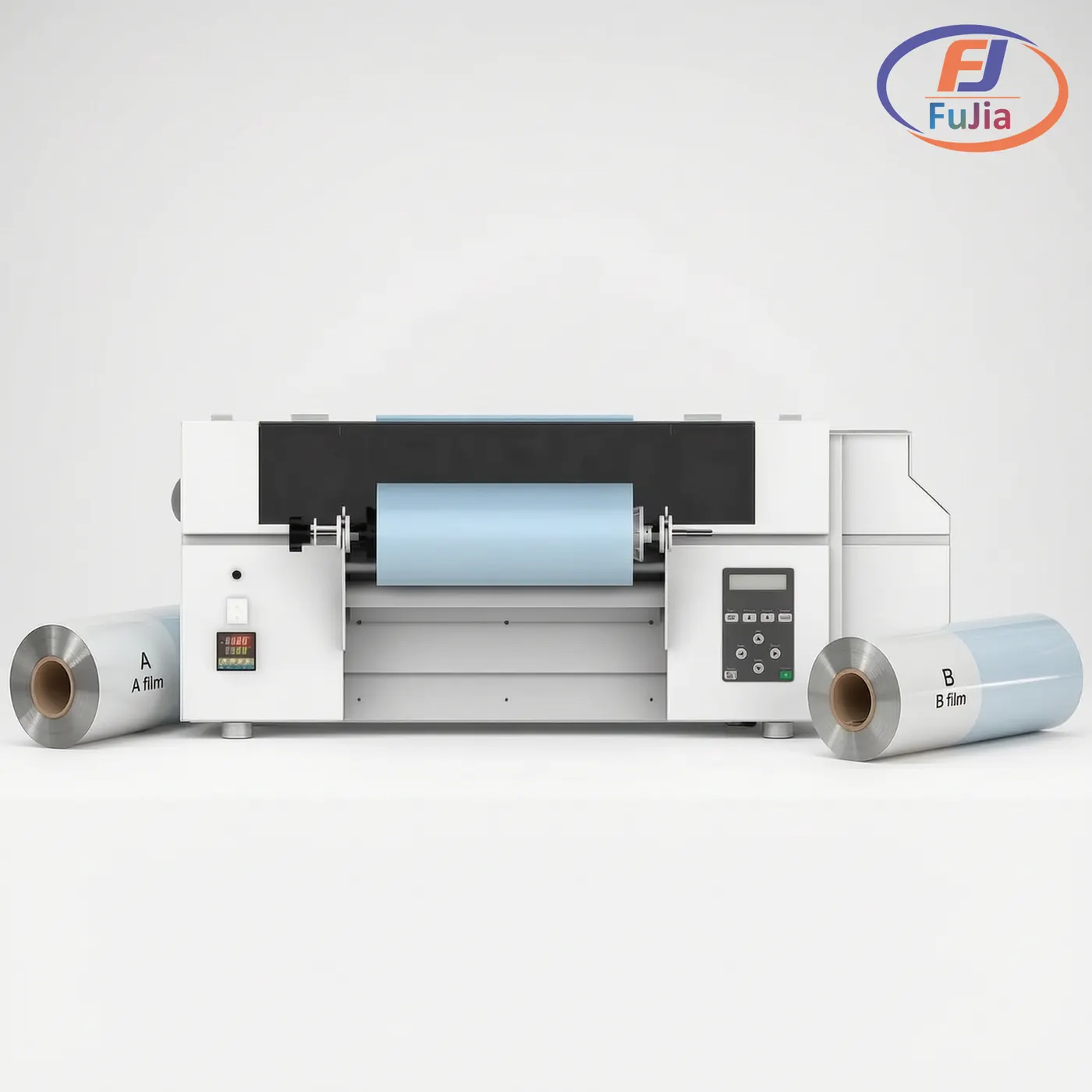
Producing UV DTF stickers requires specific equipment. The following table breaks down each component and its role in the workflow.
| Component | Purpose | Typical Spec |
|---|---|---|
| UV DTF Printer | Prints CMYK + white + varnish onto A film | Epson i3200 or XP600 printhead, UV-LED curing |
| UV DTF A Film (PET) | Receives the printed design | Transparent PET with adhesive coating |
| UV DTF B Film (PET) | Transfer layer applied over printed A film | Clear laminating film with release adhesive |
| UV Ink (CMYK+W+Varnish) | Creates color, opacity, and protection | UV-curable, photo-initiator formula |
| Laminator | Bonds B film to printed A film under pressure | Heated roller, adjustable speed |
| Cutting Tool | Trims individual stickers from gang sheets | Cutting plotter or precision scissors |
| Squeegee | Presses transfer onto target surface | Rigid plastic or rubber edge |
The printer is the most critical investment. Fujia Print’s UV DTF printer lineup uses Ricoh or Epson i3200 printheads, which deliver consistent droplet placement at 720×1200 dpi resolution. At Fujia’s testing center in Panyu, Guangzhou, every machine undergoes a 48-hour continuous print test before shipment to verify printhead alignment and ink curing stability. A printer that skips curing at this stage will produce stickers that peel within weeks.
UV ink quality matters as much as the printer. Low-cost UV ink may save 30% on consumable costs but often contains inconsistent photo-initiator ratios, leading to incomplete curing and brittle decals. Fujia’s UV ink is formulated in-house and tested alongside the printers and film it ships with, eliminating the compatibility guessing game that plagues shops buying equipment and consumables from separate suppliers.
The UV DTF Sticker Production Process
Making UV DTF stickers involves five steps from digital design to finished decal. The entire process takes under 10 minutes for a single sticker once the equipment is set up and calibrated.
Prepare the digital design. Create artwork in vector format (SVG, PDF) or high-resolution PNG at 300 DPI or higher with a transparent background. Use CMYK color mode for accurate print reproduction. No mirroring is needed because the design is applied exactly as printed.
Print onto A film. Load the A film into the UV DTF printer. The printer deposits three layers in sequence: CMYK color, white backing, and gloss varnish. UV-LED lamps cure each layer instantly as the printhead passes, so the ink is fully dry by the time printing completes.
Laminate with B film. Peel the protective layer from the B film and place it adhesive-side down over the printed A film. Run both layers through a laminator with firm, even pressure. Wait 30 to 60 seconds for the adhesive to bond fully. Air bubbles at this stage will show through the finished sticker.
Cut the sticker. Use scissors or a cutting plotter to separate individual decals from the sheet. UV DTF does not require contour cutting around the design because only the printed areas transfer to the surface. Unprinted film areas stay behind on the carrier.
Apply to the surface. Clean the target surface with rubbing alcohol to remove oils and dust. Peel the backing from the sticker, position it on the surface, and press firmly with a squeegee from the center outward. Slowly peel away the top carrier film. The design stays on the surface.
For curved items like tumblers and bottles, a hairdryer on low heat softens the adhesive for better conformance. Work in a dry, dust-free environment to prevent particles from trapping under the film during application.
UV DTF vs. Regular DTF vs. Vinyl Stickers
| Feature | UV DTF | Traditional DTF | Adhesive Vinyl |
|---|---|---|---|
| Best Surface | Hard, rigid (glass, metal, plastic) | Fabric, textiles | Flat, smooth |
| Ink Type | UV-curable | Water/pigment-based | Solvent-based |
| Curing Method | UV-LED light (instant) | Heat press | Air/heat dry |
| Application | Peel and stick, no heat | Heat press required | Peel and stick, needs weeding |
| Durability | 2 to 5+ years outdoor | 50 to 100 washes | 1 to 2 years |
| Water Resistance | Full | Full (on fabric) | Limited |
| Temperature Range | -30 to 120 degrees C | -10 to 70 degrees C | -5 to 60 degrees C |
| Color Capability | Full color + gradients | Full color + gradients | Solid colors only |
| Setup Complexity | Medium (printer + laminator) | High (printer + shaker + oven + heat press) | Low (cutter only) |
| Cost per Sticker | Medium | Low (high volume) | Low (simple designs) |
UV DTF dominates hard-goods decoration. Traditional DTF owns textiles. Vinyl remains useful for simple, single-color graphics and short-term indoor signage. For a print business that handles drinkware, phone cases, and promotional products, UV DTF eliminates the need for multiple heat presses and weeding tools while delivering higher-margin full-color work.
The DTF process has already contributed to a measurable shift in the market. The global UV DTF printer segment was valued at USD 358.5 million in 2024 and is projected to reach USD 468.6 million by 2030, according to Grand View Research. UV DTF accelerates this trend by removing the heat-press requirement that limited traditional DTF to fabric shops. For a deeper look at choosing the right UV DTF printer for production, the equipment selection process determines output quality and operating costs for years.
Where UV DTF Stickers Excel
UV DTF stickers work on virtually any hard surface with adequate smoothness. Common applications include:
- Drinkware: Tumblers, glass cups, water bottles, ceramic mugs
- Electronics accessories: Phone cases, laptop skins, tablet covers
- Signage and branding: Shop windows, product labels, display stands
- Home goods: Coasters, cutting boards, picture frames, candle jars
- Industrial labeling: Equipment tags, tool identification, safety labels
The adhesive on UV DTF transfers bonds to surfaces that vinyl struggles with, including slightly textured plastics and curved metal containers. This versatility lets one printing system serve multiple product categories without changing setup.
For businesses evaluating production scale, UV DTF fits high-mix, low-volume operations particularly well. A single gang sheet can contain dozens of different designs, each applied to a different product. Direct UV flatbed printing is faster for repetitive single-product runs, but UV DTF wins when a shop needs to personalize 50 different items in one afternoon. The broader direct-to-film printing market reached USD 2.72 billion in 2024, with UV printers representing the fastest-growing segment as hard-goods customization demand rises, according to Grand View Research’s DTF market analysis.
Common Mistakes and How to Avoid Them
Incomplete UV curing. If the varnish layer feels tacky after printing, the UV lamp intensity or print speed is misconfigured. Run a cure test on scrap film before production batches. Undercured ink will crack and peel within days.
Trapped air bubbles during lamination. B film must be applied in a single smooth pass. Stopping mid-lamination or using uneven pressure creates visible bubbles. Use a laminator rather than hand application for consistent results.
Surface contamination. Even invisible skin oils on glass or plastic prevent proper adhesion. Clean every surface with isopropyl alcohol immediately before application. Skip this step and edges will lift within a week.
Incorrect film orientation. A film has a specific print side and protective side. Loading it backward wastes material and damages printheads. Mark the correct side on the film roll to prevent errors during shift changes.
Storing transfers improperly. UV DTF transfers should be stored flat in a cool, dry place away from direct sunlight. Bending the carrier film cracks the cured ink layer. Transfers stored correctly remain usable for 6 to 12 months.
Are UV DTF stickers waterproof?
Yes. UV DTF stickers are fully waterproof once applied to a clean surface. The UV-cured ink and varnish form a sealed, non-porous layer that repels water indefinitely. This waterproof property makes UV DTF the preferred choice for drinkware such as tumblers and water bottles that are washed regularly. Submersion tests show no ink degradation after 30 days of continuous water exposure on properly cured transfers. The key variable is complete UV curing during production. If the ink is fully cured under the LED lamp, the resulting sticker handles dishwashers, rain, and humidity without peeling, fading, or blistering. Incomplete curing is the most common cause of water damage in UV DTF stickers. The UV-cured ink formulation creates a cross-linked polymer layer that achieves water resistance ratings exceeding industry standards for outdoor graphics.
How long do UV DTF stickers last?
UV DTF stickers last 2 to 5 years of outdoor exposure and significantly longer indoors. The UV-resistant ink formulation resists fading under direct sunlight, with testing showing less than 10% color shift after 500 hours of accelerated UV aging. Temperature tolerance ranges from -30 to 120 degrees Celsius, so applied stickers survive freezing winters and hot car interiors. On frequently handled items like phone cases, the scratch resistance of the varnish layer typically maintains visual quality for 1 to 2 years before showing wear. Proper surface preparation extends lifespan significantly. A sticker applied to an alcohol-cleaned surface will outlast one applied to a dusty or oily surface by months or years. The accelerated UV aging test methodology follows ASTM D4329, the standard practice for fluorescent ultraviolet lamp exposure of nonmetallic materials.
Can I use a regular printer for UV DTF stickers?
No. UV DTF printing requires a printer specifically designed for UV-curable ink. Standard inkjet printers use water-based dye or pigment ink that cannot bond to UV DTF film or cure under UV light. UV DTF printers have UV-LED curing lamps mounted on the printhead carriage, specialized ink channels for CMYK plus white plus varnish, and firmware configured for the three-layer print sequence. Attempting to print UV DTF film on a standard printer produces wet, smearing ink that never dries. Desktop UV DTF printers suitable for small business use start at significantly lower price points than industrial flatbed UV printers, making entry-level production accessible without a large capital investment.
What is the difference between UV DTF and regular DTF?
UV DTF and regular DTF differ in ink chemistry, curing method, and target substrate. UV DTF uses UV-curable ink cured by LED light, applied to hard surfaces without heat. Regular DTF uses water-based pigment ink fused with hot-melt powder, applied to fabric using a heat press at 150 to 170 degrees Celsius. UV DTF stickers are rigid, glossy, and weatherproof, suited for glass, metal, and plastic. Regular DTF transfers are soft, flexible, and washable, designed for cotton, polyester, and blended garments. The two processes share the film-transfer concept but serve entirely different product categories. A print shop serving both drinkware and apparel needs both systems.
Conclusion
UV DTF stickers give print businesses a versatile, high-margin decoration method for hard surfaces, combining full-color printing, instant curing, and peel-and-stick application. For factory-direct UV DTF printer and consumable pricing with in-house testing and single-source warranty support, contact Fujia Print.
