

UV DTF printing is a direct-to-film process that uses UV-curable ink to print full-color images onto an AB transfer film, which is then peeled and applied to hard surfaces like glass, metal, plastic, and wood without heat or pre-treatment. The process combines UV ink’s instant curing with film-based transfer, producing durable decals in 10 to 15 seconds of hand pressure. Fujia Print builds UV DTF printers sized from A3 desktop to A1 industrial models for this exact workflow.
Key Takeaways
- UV DTF printing prints UV-cured ink onto AB film, then transfers the cured image to any hard surface by hand in 10 to 15 seconds.
- The process skips pre-treatment, heat pressing, and weeding, which separates UV DTF printing from regular DTF printing and screen printing.
- Per-label ink and film cost lands between $0.02 and $0.05 at production volume, with daily output of 1,000 to 5,000+ labels on an A1 machine.
- Surface hardness reaches 3H pencil grade with varnish, surviving 100+ dishwasher cycles on drinkware.
- UV DTF printing serves product labeling, promotional products, drinkware decoration, and product labeling solutions where low MOQ and fast turnaround matter.
What Is UV DTF Printing?
UV DTF printing (ultraviolet direct-to-film printing) is a two-stage digital decoration process. Stage one prints CMYK plus white plus varnish onto a dual-layer AB film using a UV-LED cured inkjet printer. Stage two laminates the printed layer onto a B-film carrier, peels the image, and presses the image onto a substrate by hand at room temperature.
The “UV” half refers to the ink chemistry. UV-curable ink contains photoinitiators that polymerize the moment a 395 nm UV-LED lamp exposes the ink surface, turning liquid ink into a solid polymer film in under one second. The “DTF” half refers to the film transfer mechanism borrowed from direct-to-film garment printing, where the image is printed on a temporary carrier and moved to the final substrate afterward. UV DTF printing merges the two ideas so that one printer can decorate curved, rigid, or heat-sensitive surfaces that a flatbed UV printer cannot reach directly.
The process works on glass tumblers, ceramic mugs, stainless steel bottles, acrylic blocks, ABS phone cases, wooden plaques, leather goods, and powder-coated metal. Because the image cures on the film before transfer, the substrate never enters a printer bed and never sees heat above ambient room temperature.
How the UV DTF Printing Process Works
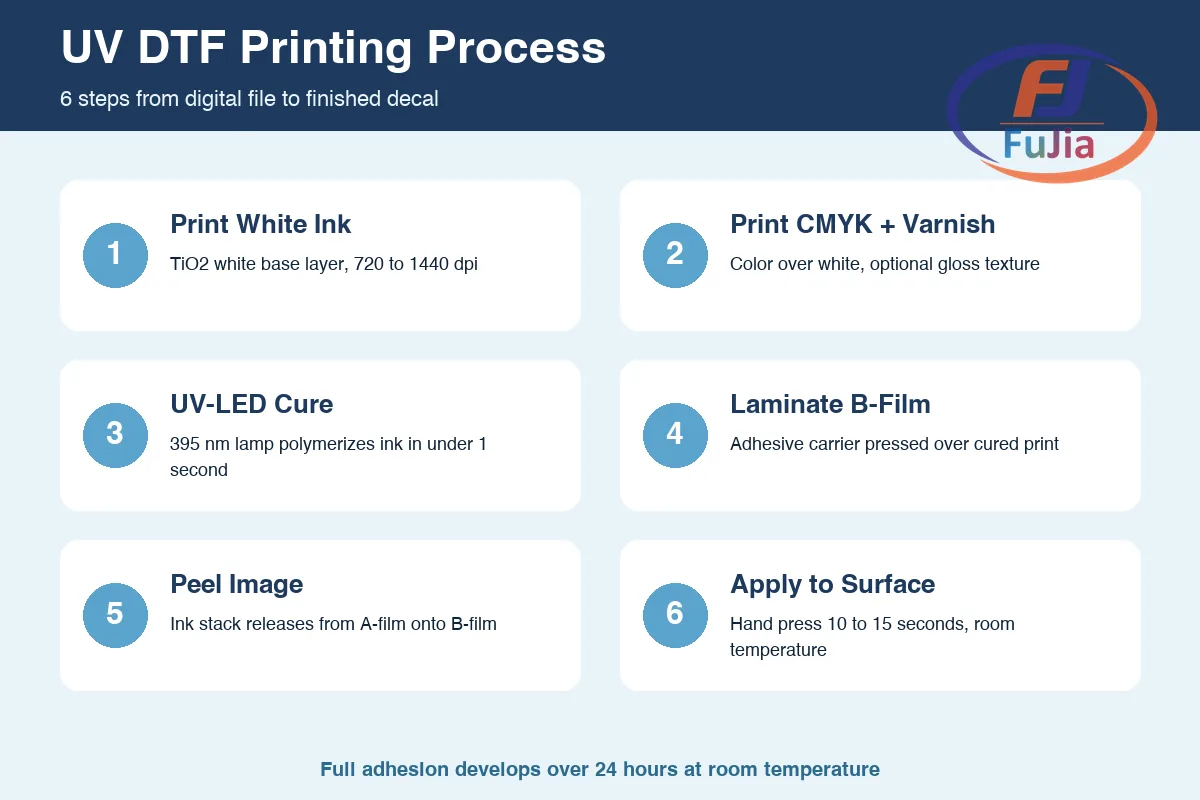
A UV DTF printer deposits ink onto a transparent A-film in a fixed sequence, then uses a B-film adhesive layer to lift the cured image and carry the image to the substrate. The entire workflow runs cold, which is why UV DTF printing can decorate heat-sensitive plastics and sealed glassware that heat-press workflows would damage.
The 6-step UV DTF workflow
- Print white ink first. The printer lays down a white opacifying layer in the shape of the design, using TiO2-based UV white ink at 720 to 1440 dpi.
- Print CMYK color on top. Cyan, magenta, yellow, and black ink print directly over the wet white layer, followed by an optional varnish pass for gloss or matte texture.
- Cure each layer with UV-LED. A water-cooled 395 nm lamp polymerizes every ink pass instantly, producing a dry, tack-free print at the printer exit.
- Laminate B-film onto the print. An adhesive B-film is pressed over the cured A-film print, bonding to the topmost ink surface.
- Peel the image. The operator lifts the B-film, and the entire cured ink stack (white plus color plus varnish) releases from the A-film and rides on the B-film adhesive.
- Apply to the substrate. The B-film is pressed onto the target surface by hand or with a squeegee, then the carrier is peeled away, leaving the image bonded to the substrate.
Full adhesion develops over 24 hours at room temperature, at which point the printed image reaches its rated 3H pencil hardness and dishwasher rating of 100+ cycles.
Printer specifications that drive output
| Specification | A3 Desktop UV DTF | A1 Industrial UV DTF |
|---|---|---|
| Print width | 30 cm | 65 cm |
| Printheads | 1 to 2 Epson | 3 to 4 Epson or Ricoh |
| Ink channels | CMYK + White | CMYK + White + Varnish |
| Daily label capacity | 200 to 800 | 1,000 to 5,000+ |
| Typical use case | Short-run custom decals | Contract crystal label production |
Fujia’s A1 UV DTF line reaches 65 cm print width with 3 or 4 printheads, matching the throughput numbers shown above. The CMYK plus White plus Varnish channel layout is what enables the spot gloss and tactile texture that push per-label pricing 30 to 50 percent higher than flat CMYK-only prints.
UV DTF vs Regular DTF: Key Differences
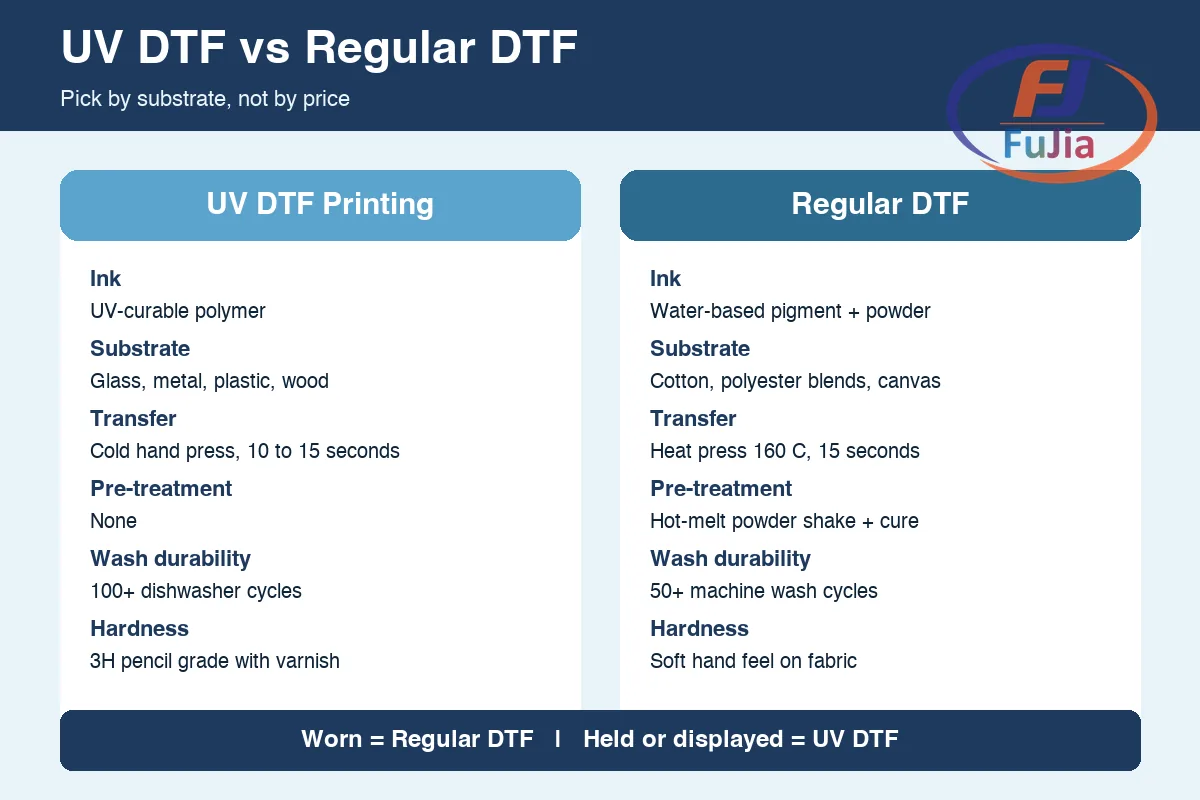
UV DTF printing and regular DTF printing share the same transfer concept but diverge sharply in ink chemistry, substrate range, and equipment cost. Understanding the split prevents buyers from purchasing the wrong machine for the wrong product line.
| Dimension | UV DTF printing | Regular DTF printing |
|---|---|---|
| Ink type | UV-curable liquid polymer | Water-based pigment ink + hot-melt adhesive powder |
| Substrate | Hard surfaces: glass, metal, plastic, wood | Soft surfaces: cotton, polyester blends, canvas |
| Transfer method | Cold hand press, 10 to 15 seconds | Heat press at 160 degrees C for 15 seconds, cold peel |
| Pre-treatment | None | Hot-melt powder shake and cure |
| Wash durability | 100+ dishwasher cycles | 50+ machine wash cycles (AATCC Grade 4 to 5) |
| Equipment focus | UV DTF printers | DTF printers |
The simplest decision rule is substrate-driven. If the end product is worn (garments, bags, textiles), regular DTF printing is the correct choice. If the end product is held or displayed (tumblers, phone cases, UV DTF stickers, glassware), UV DTF printing is the correct choice. Shops running both product lines often keep one machine of each type rather than forcing a single process to serve both materials.
Applications and Materials
UV DTF printing covers any rigid or semi-rigid surface that accepts a pressure-sensitive adhesive bond. The substrate list below reflects real production runs rather than theoretical compatibility charts.
Where UV DTF printing wins today
- Drinkware decoration. Tumblers, glass bottles, ceramic mugs, and stainless steel cups take UV DTF transfers in 10 to 15 seconds each, at a rate of 30 to 40 pieces per hour by hand. One Fujia customer in the drinkware sector grew daily output from 200 to 300 pieces while cutting material waste from 15 percent to 9 percent after switching from pad printing.
- Promotional products. Phone cases, power banks, USB drives, and corporate gifts print in full color with no MOQ penalty. A phone case brand using a UV 6090 flatbed with a rotation jig expanded SKU count from 12 to 40+ in 60 days, reaching 8,000 pieces per month at 75 percent margin.
- Product labeling. Small appliance brands replaced screen-printed labels with UV DTF crystal labels, cutting setup cost from $150 to $400 per screen to $0, and loading a new design in 30 seconds. Sports equipment sellers raised retail price 15 percent by shifting from paper labels to crystal labels.
- Signage and awards. Acrylic plates, wooden plaques, and metal trophies accept UV DTF transfers without drilling or fastening, with varnish adding tactile texture for premium products.
Substrate compatibility reference
| Material category | Examples | Adhesion notes |
|---|---|---|
| Glass | Tumblers, bottles, jars | Prime substrate, 100+ dishwasher cycles |
| Metal | Stainless steel, aluminum, powder coat | Wipe with isopropyl alcohol before transfer |
| Plastic | ABS, PC, acrylic, PVC | Avoid soft plasticizers in flexible PVC |
| Wood | Plaques, cutting boards | Sealed or varnished wood bonds best |
| Ceramic | Mugs, tiles | Works without kiln, unlike sublimation |
A material database built over years of testing covers 300+ substrates on the UV side alone, which is why new UV DTF printing operators can usually confirm compatibility for an unfamiliar material without running a trial batch.
How Much Does UV DTF Printing Cost?
UV DTF printing cost breaks down into three buckets: machine investment, consumables per print, and labor per batch. Each bucket behaves differently as volume scales.
Machine investment
| Tier | Model class | Print width | Price range | Daily capacity |
|---|---|---|---|---|
| Entry | A3 UV DTF, 1 to 2 heads | 30 cm | $1,800 to $4,800 | 200 to 800 labels |
| Mid | A2 UV DTF, 2 heads | 42 cm | $5,000 to $9,000 | 500 to 1,500 labels |
| Industrial | A1 UV DTF, 3 to 4 heads | 65 cm | $12,000 to $25,000 | 1,000 to 5,000+ labels |
Prices reflect factory-direct pricing for complete systems including RIP software, printheads, and a starter consumables kit.
Per-print consumables
| Consumable | Cost range | Coverage |
|---|---|---|
| AB film (A1, 60 cm) | $0.08 to $0.15 per linear meter | 1 to 2 labels per linear meter, depending on size |
| UV ink (CMYK + White + Varnish) | $0.02 to $0.05 per label | Typical 4-inch decal |
| B-film adhesive | $0.01 to $0.02 per label | Single-use carrier |
Total per-label cost lands between $0.02 and $0.05 at A1 volume, based on aggregate data from Fujia customers across 50+ countries. This is the figure that makes UV DTF printing competitive with screen printing below 3,000 identical pieces, where screen printing setup cost ($150 to $400 per screen) overwhelms unit economics.
Break-even and ROI
A UV DTF setup breaks even on in-house production versus outsourced screen printing below 3,000 identical pieces per design. For shops running mixed short-run work (10 to 50 pieces per design), in-house UV DTF printing wins on every order because the setup cost is zero and design loading takes 30 seconds. ROI across the 500+ print businesses Fujia serves typically falls within 3 to 8 months when the shop has existing order flow for custom drinkware, promotional products, or UV curable ink based labeling work.
What is UV DTF printing?
UV DTF printing is a digital decoration process that uses a UV-LED cured inkjet printer to deposit CMYK, white, and varnish ink onto a dual-layer AB transfer film, then transfers the cured image onto a rigid substrate by hand at room temperature. The process requires no heat press, no pre-treatment, and no weeding, which distinguishes UV DTF printing from both regular heat-transfer DTF and screen printing. The output is a full-color, scratch-resistant decal bonded to surfaces like glass, metal, plastic, ceramic, and wood, with a rated surface hardness of 3H pencil grade and dishwasher survivability above 100 cycles when varnish is applied. UV DTF printing is commonly used for drinkware decoration (tumblers, mugs, bottles), promotional products (phone cases, corporate gifts), product labeling (crystal labels on consumer goods), and signage on acrylic or metal plates. The cold-transfer nature of the process allows decoration of sealed glassware and heat-sensitive plastics that would warp or crack under a heat press.
Is UV DTF better than regular DTF?
UV DTF and regular DTF serve different substrate categories, so neither process is universally better. UV DTF printing is the correct choice for hard surfaces (glass, metal, plastic, wood, ceramic) because the UV-cured ink bonds as a pressure-sensitive decal at room temperature. Regular DTF is the correct choice for textiles (cotton, polyester blends, canvas) because the hot-melt adhesive powder bonds into fabric fibers under a 160 degree C heat press, surviving 50+ machine washes. A shop producing custom tumblers should buy a UV DTF printer. A shop producing custom T-shirts should buy a regular DTF printer. Shops serving both product lines typically run one machine of each type, since forcing a single process onto the wrong substrate produces poor adhesion, peeling, or substrate damage. The equipment cost is comparable (both land in the $2,000 to $25,000 range depending on print width and head count), so the decision should be substrate-driven rather than price-driven.
How much do UV DTF transfers cost?
At production volume, UV DTF transfers cost between $0.02 and $0.05 per label in consumables (AB film plus UV ink plus B-film adhesive), based on aggregate data from Fujia customers across 50+ countries. Outsourced UV DTF transfers from print service providers typically retail between $0.10 and $0.79 per decal depending on size, with gang-sheet pricing dropping below $0.10 per small sticker. The machine investment ranges from $1,800 for an A3 desktop system to $25,000 for an A1 industrial 4-head system. Break-even versus outsourced transfers usually falls between 2,000 and 5,000 decals, after which in-house production drops per-label cost to the consumables-only figure above. Varnish effects (spot gloss, matte texture, raised tactile) command 30 to 50 percent higher retail pricing per label, which is why most production UV DTF printers include a dedicated varnish channel rather than running CMYK plus White only.
Can a regular DTF printer print UV DTF?
No, a regular DTF printer cannot print UV DTF transfers because the two processes use incompatible ink chemistries and curing mechanisms. Regular DTF printers use water-based pigment ink plus hot-melt adhesive powder, dried by infrared heating and cured by a heat press at 160 degrees C. UV DTF printers use UV-curable liquid polymer ink that polymerizes instantly under a 395 nm UV-LED lamp. The printheads, ink delivery system, curing module, and transfer film are all different. Converting a regular DTF printer to UV DTF requires replacing the ink system, adding a UV-LED curing lamp, swapping to UV-compatible printheads (Epson I3200-U1 or Ricoh GEN5/6), and changing to AB film instead of single-layer PET. The conversion cost typically exceeds the price of a dedicated A3 UV DTF printer, so operators serious about UV DTF printing should purchase a purpose-built machine rather than converting existing equipment.
Conclusion
UV DTF printing fills the gap between flatbed UV printing and heat-transfer decoration by moving a UV-cured image from film to any rigid surface in 10 to 15 seconds of cold hand pressure. For factories and print shops evaluating in-house production of crystal labels, drinkware decoration, or short-run product labeling, the per-label cost and break-even math favor UV DTF over screen printing at any volume below 3,000 identical pieces. For factory-direct UV DTF printer pricing and free sample inquiries, contact Fujia Print or browse the UV DTF printer lineup.
Sources
- Ultraviolet curing – Wikipedia: documents the photoinitiator polymerization mechanism and 395 nm UV-LED wavelength used in UV DTF ink curing.
- Direct-to-film printing – Wikipedia: defines the film-transfer concept that UV DTF printing adapts from the garment decoration industry.
- ASTM D3363 – Standard Test Method for Film Hardness by Pencil Test: defines the 3H pencil hardness rating cited for cured UV DTF varnish surfaces.
